Summary, metrics, and Tensorboard#
ALF uses Tensorboard to track and visualize training statistics.
Tensorboard background#
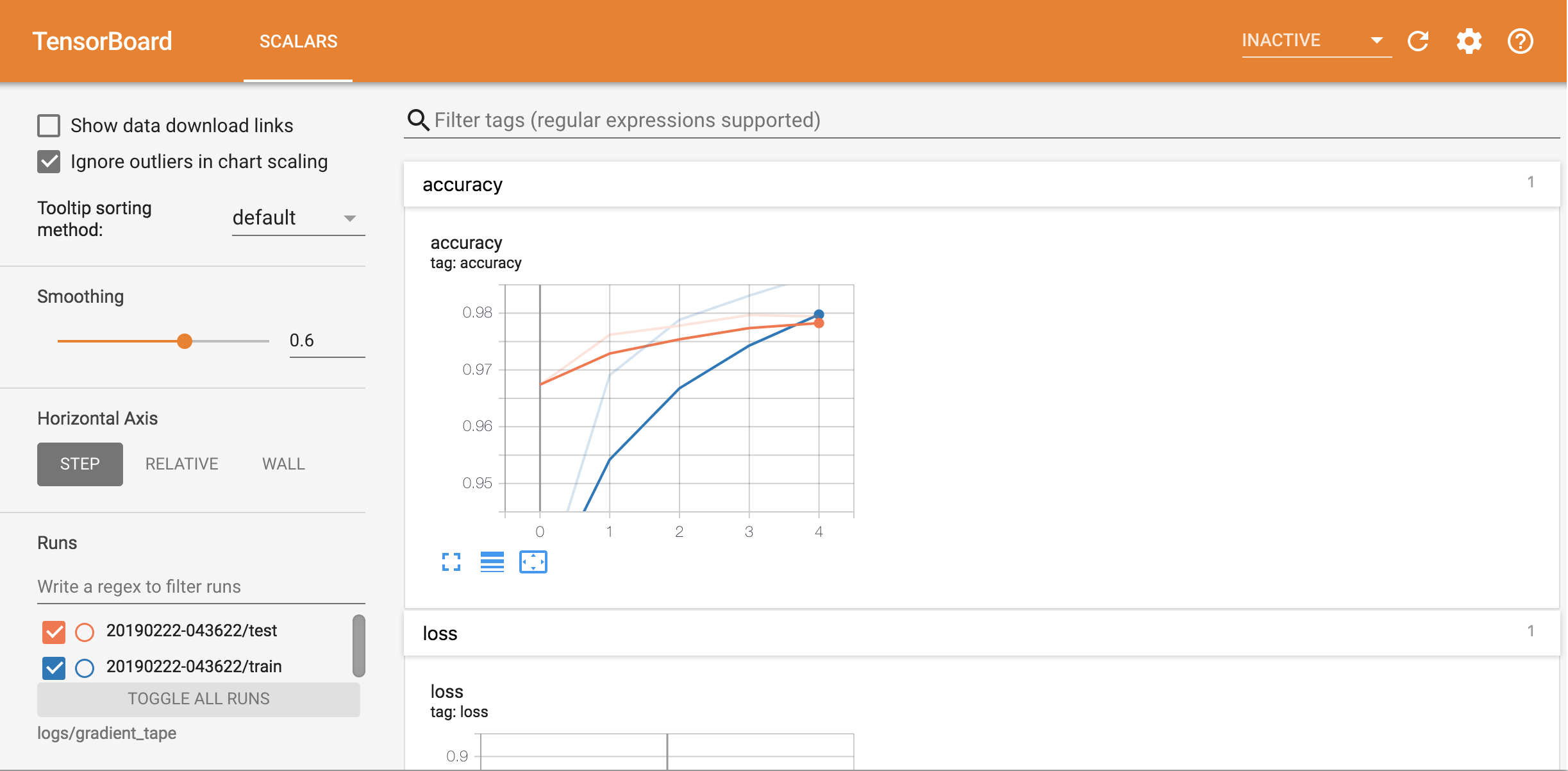
In a nutshell, we summarize a scalar, a histogram, an image, etc by calling Tensorboard’s API functions that also take a global step counter as the input. The global steps serve as x-axis ticks to align different metrics. A global counter can usually be defined as the training iteration number or gradient update number. One example of using the TB’s official APIs is
# create file writers to record the training and testing accuracies respectively
train_summary_writer = tf.summary.create_file_writer("/tmp/log_dir/train")
test_summary_writer = tf.summary.create_file_writer("/tmp/log_dir/test")
for epoch in range(EPOCHS):
    # ... code for computing the training loss and training accurarcy
    with train_summary_writer.as_default():
        tf.summary.scalar('accuracy', training_accuracy, step=epoch)
    # ... code for computing the testing accuracy
    with test_summary_writer.as_default():
        tf.summary.scalar('accuracy', test_accuracy, step=epoch)
    # by providing the same scalar name, TB will show the two accuracy curves
    # in the same figure.
And by opening the TB page
tensorboard --logdir /tmp/log_dir
We’ll see something like
We strongly suggest that the user first read Tensorboard’s official guide to get familiar with TB basics.
ALF summary#
ALF wraps tf.summary as alf.summary (alf.summary.summary_ops) to
provide additional useful functionalities, including
global counter management,
turning on/off of the summary according to conditions,
name scope support.
ALF also provides a set of helper summary functions in the context of deep RL (alf.utils.summary_utils).
Global counter#
ALF automatically maintains a global counter as the current training iteration
number. Recall that the total number of iterations can be set by num_iterations,
or it will be automatically calculated if num_env_steps is
provided. So the x-axes of most TB figures should represent training iterations.
In some off-policy cases, we have several gradient updates for each iteration,
for example, PPO. And sometimes we’d like to summarize metrics based on the gradient
update number. Thus we can set the global counter as the gradient update number instead,
by setting TrainerConfig.update_counter_every_mini_batch=True. This will make
the x-axis display the number of mini-batch updates.
Note
The relationship between total number of iterations and total number of updates is captured by
updates = TrainerConfig.num_updates_per_train_iter * TrainerConfig.num_iterations
In some rare case of replaying a whole buffer but each gradient update only
uses a portion of the whole buffer, then an additional factor whole_buffer_size / batch_size
should be multiplied. (For example, we can specify mini_batch_length
and mini_batch_size for PPO even though the entire
replay buffer is replayed at every iteration.)
Since the global counter is implicitly maintained by ALF, we usually don’t need
to specify a step when using alf.summary.
alf.summary.scalar("accuracy", training_accuracy)
ALF will write all summarized metrics before the next increment (next iteration or next mini-batch) of the global counter to the same step.
Note
If you write metrics to the same tag/label multiple times within one step, the behavior is undefined. Usually you’ll see multiple y values at a single x tick.
Turning on/off summary#
At any point of the code, you can enable or disable the summary by
alf.summary.enable(True)
alf.summary.enable(False)
This forces to turn on or off all summary code globally.
If you’d like to enable or disable based on a certain condition, then use the
record_if context manager:
for i in in range(100):
    # record only on odd value of i
    with alf.summary.record_if(lambda: i % 2):
        alf.summary.scalar("i", float(i))
        # increment the counter otherwise all scalars are written to the same x!
        alf.summary.increment_global_counter()
Note that ALF maintains a stack of record_if conditions. So if you start
a record_if context, then it always overwrites existing conditions. For example,
for i in range(100):
    with alf.summary.record_if(lambda: i % 2):
        with alf.summary.record_if(lambda: i % 3 == 1):
            # recorded every one out of three `i`s
            alf.summary.scalar("i_3", float(i))
        # recorded every one out of two `i`s
        alf.summary.scalar("i_2", float(i))
    # there will be no data points for even values of i where i % 3 != 1
    alf.summary.increment_global_counter()
By default, ALF’s trainer places a record_if condition at the bottom of the stack.
This condition is defined by TrainerConfig.summary_interval. It’s evaluated
to be True if
the global step is less than
summary_interval, orthe global step is a multiple of
summary_interval.
The reason why we have the first condition is that sometimes we want to inspect
closely on the training metrics step by step when the training just starts, which
is helpful for debugging. Because of the second condition, we will normally only
see metric values every summary_interval steps in TB.
Like other record_if conditions, this summary interval condition can be overwritten
by another condition on top of the stack:
with alf.summary_record_if(lambda: True):
    # always summarize the code in this context at every step
    alf.summary.scalar(...)
Note
record_if stack is only activated when alf.summary.enable(True) has
been called. You can use the function alf.summary.is_summary_enabled()
to check whether the summary is enabled or not.
Summary name scope#
ALF also maintains a name scope stack for conveniently managing summary metric names. This stack greatly simplifies naming metrics.
with alf.summary.scope("root"):
    alf.summary.scalar("val", 1)     # TB tag is "root/val"
    with alf.summary.scope("train"):
        alf.summary.scalar("val", 1) # TB tag is "root/train/val"
It’s recommended that you use class or function names as summary scopes so that it’s easy to locate where the metrics are summarized and what they are for.
Summary utils functions for RL#
ALF provides various helper functions for summarizing quantities in the context of
deep RL, for example, summarize_action(),
summarize_action_dist(),
summarize_gradients(), etc. See
alf.utils.summary_utils for a complete list.
Important metrics for RL#
By default, ALF summarizes several important RL metrics during training and evaluation.
All these metrics (defined in alf.metrics.metrics) are summarized on the
episode basis.
NumberOfEpisodes: how many episodes have been trained so far.EnvironmentSteps: how many environment steps have been trained so far.AverageReturnMetric: the return of an episode, averaged over several most recent episodes.AverageEpisodeLengthMetric: the length of an episode, averaged over several most recent episodes.AverageEnvInfoMetric: the accumulation of any quantity returned by Gym env info during an episode, averaged over several most recent episodes.AverageDiscountedReturnMetric: the discounted return of an episode, averaged over several most recent episodes.
Note
For metrics 3-6, you can configure buffer_size of the classes to decide how
many recent episodes to use.
These important RL metrics are summarized against several types of step counters:
the global step counter as introduced earlier,
the total number of environment steps so far, and
the total number of episodes so far.
You will see the tabs “Metrics”, “Metrics_vs_EnvironmentSteps”, and “Metrics_vs_NumberOfEpisodes” respectively in the TB.
Defining new episode metrics#
For step-wise summary, we can directly use the summary functions in alf.summary.summary_ops.
To define new episode metrics, please take a look at alf.metrics.metrics
on how to use AverageEpisodicAggregationMetric for this purpose.
After defining the new episode metric, you’ll need to override the __init__()
of RLAlgorithm to insert this new metric. The existing ones are currently
hard-coded as below:
example_time_step = env.reset()
self._metrics = [
    alf.metrics.NumberOfEpisodes(),
    alf.metrics.EnvironmentSteps(),
    alf.metrics.AverageReturnMetric(
        buffer_size=metric_buf_size,
        example_time_step=example_time_step),
    alf.metrics.AverageEpisodeLengthMetric(
        example_time_step=example_time_step,
        buffer_size=metric_buf_size),
    alf.metrics.AverageEnvInfoMetric(
        example_time_step=example_time_step,
        buffer_size=metric_buf_size),
    alf.metrics.AverageDiscountedReturnMetric(
        buffer_size=metric_buf_size,
        example_time_step=example_time_step)
]
Summary#
In this chapter, we’ve covered how to write summary code in ALF. To efficiently debug and monitor RL training jobs, various summary metrics are always important clues. It is a good practice to add customized summary code when you write your own algorithm.